Action
The Action panel lets you manage your Smartform and control how it is used.
From here, you can publish, activate, preview, and test your Smartform.
Open the Action panel
- Go to the Design tab
- Use the panel on the left side of the screen
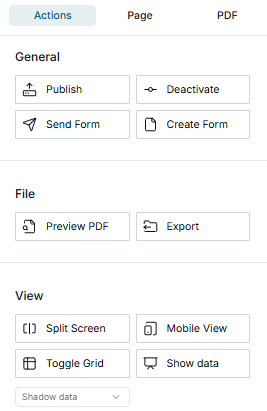
Action buttons
The following actions are available:
| Category | Button | Description |
|---|---|---|
| General | Publish | Save and publish the Smartform as a new version |
| General | Activate | Make the published Smartform available for use |
| General | Deactivate | Disable the active Smartform |
| General | Send Form | Send the Smartform to recipients |
| General | Create Form | Open a new instance of the Smartform |
| File | Preview PDF | View how the Smartform will look as a PDF |
| File | Export | Download the Smartform as a file |
| View | Split Screen | Show the editor together with Data or PDF view |
| View | Mobile View | Preview how the Smartform looks on mobile devices |
| View | Toggle Grid | Show or hide the layout grid to help alignment |
| View | Show Data | Show or hide preview data from shadow data or configured datasets |
Typical usage
A common workflow when working with Smartforms:
- Make changes in the Design view
- Click Publish to save a new version
- Click Activate to make it available
- Use Create Form to test the Smartform
- Use Preview PDF if the Smartform will be exported