Split Screen
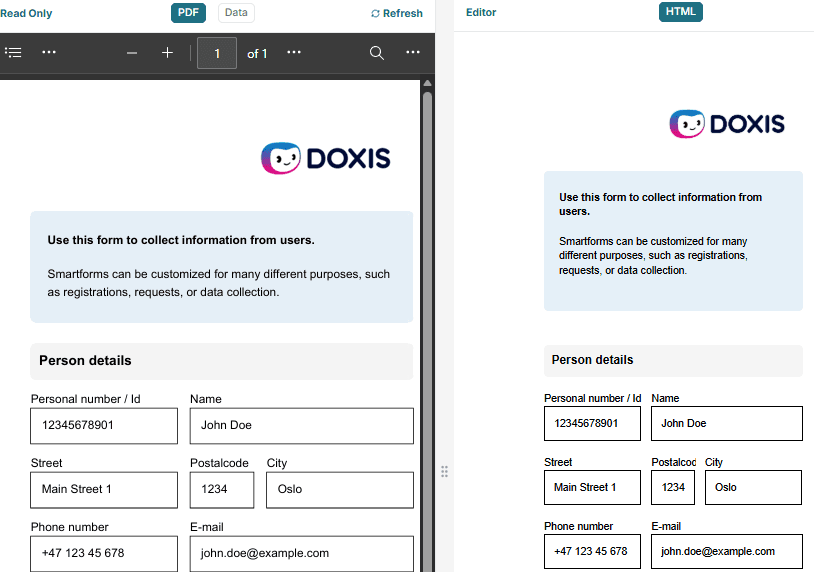
The Split Screen feature in Smartform Design lets you work with your form layout and supporting tools side-by-side, streamlining both design and testing.
Layout and Views
-
HTML View:
Always visible and located on the right side of the canvas. This is where you create and edit your Smartform. All changes to the form are made here. -
Left Panel Views:
You can choose to display either the Data view or the PDF view on the left side of the canvas.
1. Data View
- Create Dataset: Define and manage the structure and sample data for your form.
- JSON Body Preview: View and edit the raw JSON representation of your dataset.
- Add Test Data: Enter demo values to simulate user input.
- cURL Generation: Generate a cURL command for API integration and testing.
2. PDF View
- PDF Preview: See how the PDF generated from your Smartform will look.
- Refresh Required: After making changes in the HTML view, click the refresh button at the top of the page to update the PDF preview.
3. HTML View
- Form Designer: Always present on the right, this is your main workspace for building and editing the Smartform.
💡 Tip: Use Split Screen to quickly switch between designing your form, testing data flows, and previewing the final PDF output.