Rules
The Rules section lets you create dynamic behavior in your Smartform.
You can use rules to:
- React to incoming data
- Modify values
- Control how the form behaves
Rules are typically used together with API, Workflows, or Datasets.
How Rules work
Rules depend on variables (input data) and are processed in a specific order.
A typical setup looks like this:
- Define variables
- Transform data using rules
- Test and verify the result
Each step builds on the previous one.
Step 1: Variables
Variables are the foundation of the Rules system.
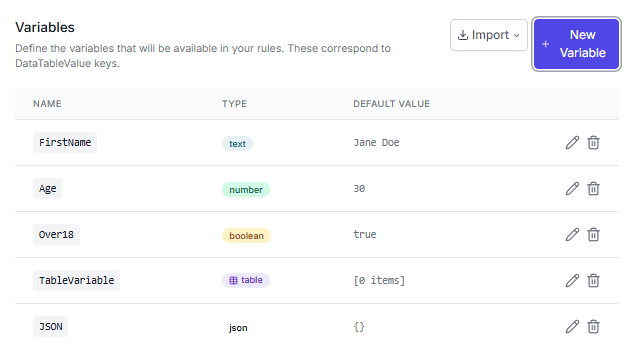
They represent data that is passed into the Smartform, for example from:
- API
- Workflow
- Dataset (for testing)
Examples of variables:
- Name
- Age
- Address
- IDs
- Lists or tables
Variables are used in:
- Data Transformation
- Show/Hide rules
- Page Templates
💡 Without variables, rules cannot run.
Step 2: Data Transformation
Data Transformation rules let you process and modify data.
You can:
- Update variable values
- Apply logic (IF / ELSE)
- Split or group data
- Prepare values for other rules
Rules are executed from top to bottom, and each rule can use results from previous ones.
Step 3: Test Runner
The Test Runner helps you verify that your rules work correctly.
You can:
- Enter test values
- Run all rules
- See the output
- Validate logic before going live
Key points
- Variables must be created before they can be used
- Rule order affects the result
- Test Runner does not change live data
Summary
To work with Rules:
- Define your variables
- Create transformation logic
- Test everything before use
Following this process helps you build reliable and easy-to-maintain Smartforms.