Scripts
A script is a piece of script code, which executes a required operation. Scripts can be called within a document. The script takes no input parameter and returns no explicit values.
Scripts in MetaTool are written in either JScript or VBScript scriptengine. You select which script language to use under File/Properties (see chapter 5 Properties). Apart from methods from MetaEngine (see below) you have JScripts/VB-Script´s own methods and functions and also ActiveX/COM components.
This makes the use of scripts very powerful; in principle you can build the whole document by using scripts. However, we do not recommend that because you then will lose the structure of the document and it will be more difficult to understand and maintain.
When working with a solution set up, it is possible to have two script languages available, but only ONE can be active in a project. When copying a script in a different script language from another project, the script will be empty but a Copy button will be available.
You can then copy the other language into the same name, but it has to be manually converted to the target language of the project.
Click on Help in the script editor for a complete reference manual over both JScript and VB-Script. To see more script code examples you can visit sites like https://www.w3schools.com/js/
To debug your scripts see chapter Debugging.
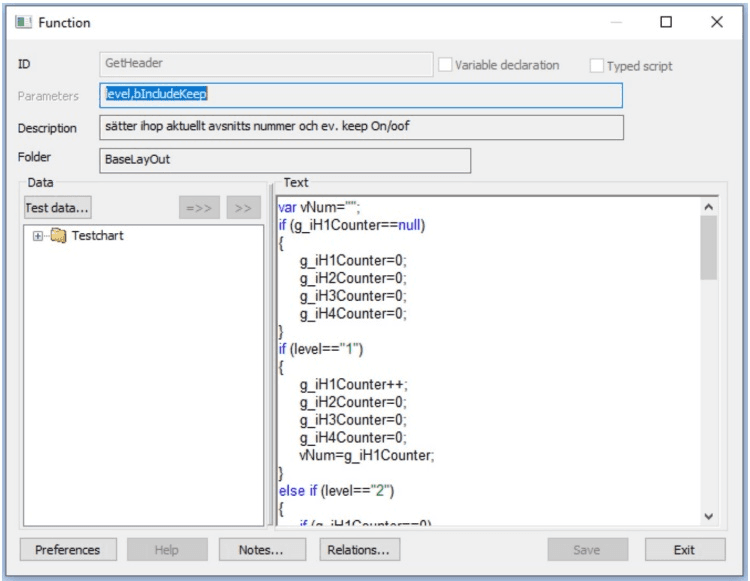
To add a script you either select Edit/Scripts… or right click in the scripts view. See chapter Generic list dialog.
| Function | Explanation |
|---|---|
| ID | Is only possible to set for a new script. The identification of the script MUST be made up by alphanumeric values (0-9, a-z, A-Z) and “underscore” (_) only. ID’s first character must not be a number. The ID cannot contain space. |
| Description | A text describing the script item. |
| Folder | Set the search path in the script tree. |
| Test data | Offers the option to select test data. See chapter Test data. To enter a variable in the script editor, mark the required variable from the test data tree and press >>. |
| Preferences | Sets the color for variables, text strings and comments in the editing window. Click the number in the first column and select color. Furthermore you can select font size and type face for the characters in the text window. See below. |
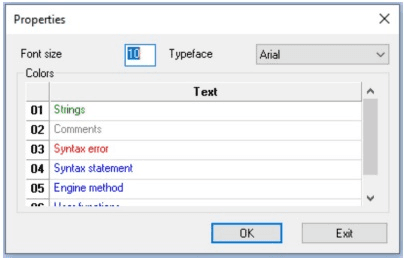
Script editor context menu
A right click in the script editor and selecting Insert will produce a list of all available Metaforce methods. The syntax is adjusted to the selected script language. The result is a template of how the syntax of the selected methods looks like. It must, however, be adjusted to the needs of your own script.
Methods available from MetaEngine
Metaforce supplies a number of methods to help the document designer and they are used to communicate between ScriptEngine and the MetaEngine.
| Function | Explanation |
|---|---|
| AddIndex | Adds archive or a page index to the document. Please note! When adding index of type 3 the name must be a valid XML attribute. When adding index of type 4 the name must be empty or a valid XML node name. |
| AddDocument | Adds a document in the saved area, either at the top or at the bottom |
| AttributeExists | Returns a boolean value (true=1, false=0) if the specified attribute can be found. |
| Archive Index… | Fetches AddIndex, IndexType 3, IndexName from either a Dynamo folder definition file (XML-format) or from a database by opening “Select ODBC source” dialog. |
| CountNodes | Returns the number of children the supplied node have. |
| ExistsInMetaLogic | Returns a boolean (true=1, false=0) if the supplied ObjecID of the type Type, (Document, Text, Format, Graph, Form), is present in the MetaLogic file. |
| FindInData | Returns a string that include hits found. If multiple hits then these areseparated by ”;” (semicolons) and each field start with @ (at sign). |
| GetCounter | Returns a number for a counter of the type (DocCount, SheetCount, Crashnumber, JobCount, SavedDocs, SavedSheets, SavedPages). |
| GetParmsNode | Returns a XML structure of startup information passed to the MetaEngine. |
| GetPhrase | Returns a phrase id´s value in the given language. |
| GetStringHeight | Returns a float value of a strings height in mm. |
| GetStringWidth | Returns a float value of a strings width in mm. |
| GetTypedValue | Formats the value to the formatted data type. Will return unchanged string if unsuccessful. |
| GetValue | Fetch the value of a supplied variable name. It returns a blank string if the variable does not exist. |
| GetXmlData | Fetches the existing data area in MetaEngine as an XML data structure into the ScriptEngine. A very specialised method. |
| InsertDocument | Inserts a document into the document. If the supplied ObjectID does not exist an error occurs. |
| InsertGraphObject | Inserts a business graphic object in the document. If the supplied ObjectID does not exist an error occurs. |
| InsertImage | Inserts an image. The supplied input is an XML structure that describes the images placement and data. |
| InsertObject | Inserts a form into the document. If the supplied ObjectID does not exist an error occurs. |
| InsertText | Inserts a text into the document. If the supplied ObjectID does not exist an error occurs |
| IsTextStored | Returns a boolean (true=1, false=0) if the supplied text has been stored or not. |
| PrintError | Prints out a message to the error log. (WARNING, ERROR, ABORTJOB, ABORTDOC) (For Batch documents). |
| PrintSaved | Prints the saved document from memory to a specified file type. If no file type is specified the first defined file type is selected. Non-existent file types cause an error. (For Batch documents). |
| PrintSeparatorPage | Writes a separator page. Used in batch application.(For Batch documents). |
| ReRunDocument | Is used to create a new document using the same data. (For Batch documents) |
| ReturnValue | Returns a value back to the MetaEngine that it handles according to type of script, (Row, Text, or Execute script). |
| SameEnvelope | Prints generated document to the same envelope, must be executed before selecting Filetype ID. (For Batch documents) |
| SaveDoc | Saves the document in memory. Used to “collect” document together. (For Batch documents) |
| SetBaseFileName | Sets file name on the output file (fills the MetaBatch predefined variable <BASEFILENAME>). (For Batch documents) |
| SetKeepOnMin | Sets the minimum percent value that must be written on the body before a break to next page. Affects KeepOn/KeepOff handling. (For Batch documents) |
| SetPhraseLanguage | Sets current language for phrases. |
| SetValue | Inserts a named variable and its value in data. |
| SetXmlData | Inserts an XML data structure into the data area in MetaEngine. A very specialised method. Please note that setting the encoding to anything other than UTF-16 will result in failure. |
| SkipDocument | It skips printing of the current document. Instead it continues with the next. (For Batch documents) |
| SplitDocument | Splits a document into several envelopes after a specified number of pages. The first header information is added as a first page in the following splitted document parts. (For Batch documents) |
| StoreText | Text items created in DXML format are saved in memory. When texts have been stored you can use the Insert Text to add a text into a letter. |
Method categories
Some of the methods can be part of more than one category but in this document we have put the methods where they are most commonly used.
Data methods
Additional prefix qualification character to the data methods that fetches data can be used. Below is the list of available qualification character that are available:
| / (slash character) | starts the search from the root level and searches down the data tree. |
| # (hash character) | starts the search from current level and down the data tree. |
| [] (left bracket, value, right bracket) | can be used to access a specific iteration in a node element; the attributes name is still the same. The iteration starts at 0 (zero), and works like this. item[1]=ordernr, item[2]=ordernr. In this case we take ordernr from row 2, and then from row 3. |
Without a qualification it works the same as in previous versions. In previous version the search went down the tree and if it could not be found below it then went up the tree to search for the field.
AttributeExists
AttributeExists(Attributename)
Returns a boolean value. The value will be true if the attribute name exists else it will return false. It does not check if it contains a value only that it exist or not.
| Parameter | Description |
|---|---|
| Attributename | Name of the attribute. Attributename can be a constant string value, a return value from function or variable. Attribute name can be qualified see above for more information. |
EXAMPLES:
-
JScript
if (AttributeExists("OptionalAttribute") { // We have optional attribute InsertText("OptionalText"); } -
VBScript
if AttributeExists("OptionalAttribute") 0 then ' We have optional attribute
 InsertDocument "OptionalText"
end if
CountNodes
CountNodes(Nodename)
Returns number of children for node name Nodename. If the Nodename does not exist a zero (0) value is returned.
| Parameter | Description |
|---|---|
| Nodename | Name of the node. Nodename can be a constant string value, a return value from function or variable. Nodename can be qualified see above for more information. |
EXAMPLES:
-
JScript
var vOneLevel = CountNodes("items"); if (vOneLevel>0) // We have data node InsertDocument("DOCID"); var vMultiLevel = CountNodes("Parents=Children"); if (vMultiLevel>0) // We have Children items under Parents InsertText("TEXTID"); -
VBScript
Dim vOneLevel, vMultiLevel
vOneLevel = CountNodes("items")
if vOneLevel > 0 then ' We have data node
 InsertDocument "DOCID"
end if
vMultiLevel = CountNodes("Parents=Children")
if vMultiLevel > 0 then ' We have Children items under Parents
 InsertText "TEXTID"
end if
GetValue
GetValue(“DataName”)
Gets a value from data area. Returns a string. If specified variable name (DataName) does not exist an empty string is returned i.e string length equal to zero (0).
| Parameter | Description |
|---|---|
| DataName | Variable name in loaded data. DataName can be constant string value, return value from function or variable. Data name can be qualified see above for more information. |
EXAMPLES:
-
JScript
var vRet=""; var vValue = GetValue("CustomerName"); if (vValue!="") vRet=vValue; -
VBScript
Dim vRet, vValue
vRet=""
vValue = GetValue("CustomerName")
if vValue <> "" then
 vRet=vValue
end if
Special runtime values
In the specific case when generating documents that are loaded into the Dynamo (ondemand or batch, not Metawrite) two specific runtime values can be retained using GetValue:
- __Load_SheetCount
- __Load_PageCount
These attributes contains the current sheet and page count for the current document.
GetTypedValue
GetTypedValue(“Value”,“DataType”,“[Format]”)
Formats the value. Returns a string.
| Parameter | Description |
|---|---|
| Value | Value of required type (date or number) Value must be fetched using the regular GetValue method or a script value. |
| DataType | Input value of accepted of type. DataType can be “LONGDATE”, “SHORTDATE”, “DATE”, “NUMBER”, “CUSTNUMBER” or “CURRENCY”. |
| Format | Custom format for the variable that can be used for DATE or CUSTNUMBER, the others take a blank string. See below for more information as to what formatting pictures that can be used. |
EXAMPLES:
-
JScript
var vRet="", vDate; vDate = GetTypedValue(GetValue("RelDate"), "SHORTDATE"); if (vDate!="") vRet=vDate; -
VBScript
Dim vRet, vValue
vRet=""
vValue = GetTypedValue(GetValue("RelDate"), "SHORTDATE")
if vValue <> "" then
 vRet=vValue
end if
Here is a list of formatting pictures that can be used and there meaning, any other character not in the list will be displayed as itself.
| Picture | Meaning |
|---|---|
| d | Day of the month as digits with no leading zero for single-digit days. |
| dd | Day of the month as digits with leading zero for single-digit days. |
| ddd | Day of the week as an abbreviation. |
| dddd | Day of the week as its fullname. |
| M | Month as digits with no leading zero for single-digit months. |
| MM | Month as digits with leading zero for single-digit months. |
| MMM | Month as an abbreviation. |
| MMMM | Month as its fullname. |
| y | Year as last two digits, but with no leading zero for years less than 10. |
| yy | Year as last two digits, but with leading zero for years less than 10. |
| yyyy | Year represented by full four digits. |
For CUSTNUMBER
| Picture | Meaning |
|---|---|
| 0-9#0/1#0/1 | decimal padding(number)#decimal separator(0/1)#thousand separator(0/1) Where 1 means it should be used: Example: 2#1#1# |
ReturnValue
ReturnValue(“Value”)
Returns a value on which MetaEngine acts. What MetaEngine does depends on the type of script (Row,Text or Execute).
When the script is a row script, then ReturnValue must return a value from the list below. Any other value is ignored.
| Parameter | Description |
|---|---|
| Value | Value to be returned. With row scripts, used to test ‘3’ (Mandatory), ‘2’ (Preselected),‘1’ (Selectable) and ‘0’ or "" (Ignore). In text fragments, used to return what should be written or interpreted in the text fragment. Value can be a constant value, return value from function or variable. |
When the script is a Text script, it can then return any kind of string. If multiple ReturnValue exist in a script then last ReturnValue string is used. ReturnValue should not be confused with JScript’s return statement.
An execute script should not use the ReturnValue since MetaEngine cannot do anything with the value returned, any return value is ignored.
EXAMPLES:
-
JScript
// row script example var vRet="0"; var vValue = GetValue("CustomerName"); if (vValue!="") vRet="2"; // the row script returns Pre-selected (2) ReturnValue(vRet); // text script example var vRet=""; var vText="This is a String to be placed in a text."; ReturnValue(vText); -
VBScript
' row script example
Dim vRet, vValuevRet=""
vValue=""
if vValue <> "" then
 vRet="2" ' the row script returns Pre-selected (2)
end if
ReturnValue(vRet)
' text script example
Dim vRet, vText
vRet=""
vText="This is a String to be placed in a text."
ReturnValue vText
SetValue
SetValue(“VarName”, “VarValue”)
Inserts a specified variable name (VarName) and a value (VarValue) in data. If SetValue is used in a node, then the variable/value is added on that level. An error occurs if SetValue is used without a variable/value pair.
| Parameter | Description |
|---|---|
| VarName | The variable name. It cannot be qualified i.e “VarNode=VarName” it will create a variable name “VarNode=VarName” instead. VarName can be a constant value, return value from function or variable |
| VarValue | The variable’s value. VarValue can be a constant value, return value from function or variable |
EXAMPLES:
-
JScript
var vName = "Smith, Bob"; var aName = vName.split(","); // Make array and split at (,) SetValue("Firstname", aName[1]); // Create variable Firstname SetValue("Lastname", aName[0]); // Create variable Lastname -
VBScript
dim vName, aName
vName ="Smith, Bob"
aName = SPLIT(vName,",") ' Make array and split at (,)
SetValue "Firstname" , aName(1) ' Create variable Firstname
SetValue "Lastname" , aName(0) ' Create variable Lastname
Specialised methods (found under Utilities)
This section describes three specialised methods that can be used to analyze the data loaded and to add additional data into the MetaEngine.
FindInData
FindInData(searchValue, searchAttribute, searchPath, searchType)
Returns a string if searchValue was found, it will be blank (empty) if not found. If the string contains multiple found records then it is separated with ”;” (semi-colon). The attribute (field) that contains the search is prefixed with an @ (at-sign).
| Parameter | Description |
|---|---|
| searchValue | Mandatory value. searchValue can be a constant value, return value from function or variable |
| searchAttribute | Attribute (field) you want to search through, must be blank (empty) or an existing attribute (field) in the data. If blank the search is done on all attributes (fields). searchAttribute can be a constant value, return value from function or variable |
| searchPath | Path you want to search through, must be blank (empty) or an existing path in the data. If blank then the search is perform against the whole metalogic file. searchPath can be a constant value, return value from function or variable. For syntax see the beginning of Datamethods section. |
| searchType | Valid search types: EQ, EQ_CASE_INSENSITIVE or EQ_CI, NE, NE_CASE_INSENSITIVE or NE_CI, LIKE, LIKE_CASE_INSENSITIVE or LIKE_CI Defines the wanted search. searchType can be a constant value, return value from function or variable |
Defines the wanted search.
searchType can be a constant value, return value from function or variable
EXAMPLES:
-
JScript
var vSearch = "10", // search for this value. vField = "qty", // search only this field vPath = "item[*]", // look in all item iterations vType = "LIKE_CI", // like case insensitive search vResult; vResult = FindInData(vSearch, vField, vPath, vType); // what is returned: // item[0]@qty;item[3]@qty;item[4]@qty -
VBScript
DIM vSearch = "10" ' search for this value
DIM vField = "qty" ' searh only this field
DIM vPath = "item[*]" ' look in all item iterations
DIM vType = "LIKE_CI" ' like case insenitive search
DIM vResult
vResult = FindInData(vSearch, vField, vPath, vType)
' what is returned:
' item[0]@qty;item[3]@qty;item[4]@qty
GetParmsNode
GetParmsNode()
Returns an XML structure of all parameters passed to MetaEngine. It can be used either in batch environment and online to find out name of input file and other interesting information. If used with PPA program it can be used to get parameters passed by the InjectParams step, see PPA documentation for more information
EXAMPLES:
-
JScript
var vList, vParms, vTest, vLen, vInjectParam, vInjectValue, vItem, i; vParms = GetParmsNode(); // Get MetaEngine if ( vParms.length>0 ) { if ( g.Xml === undefined ) { g.Xml = new ActiveXObject("Microsoft.XMLDOM"); } if ( g.Xml.loadXML(vParms) ) { vTest = g.Xml.selectSingleNode(".//Data/@OutPutType"); if ( vTest!==null ) { if ( vTest.nodeValue!==null ) { bTest = ("EMF" === vTest.nodeValue); // Running in MetaTool? } } vList = g.Xml.selectNodes(".//InjectParam"); // PPA InjectParam node(s) if ( vList.length>0 ) { vLen = vList.length; for ( i = 0; i<vLen; i++ ) { vItem = vList[i]; if ( vItem!==null ) { vInjectParam = vItem.attributes.getNamedItem("Name").nodeValue; vInjectValue = vItem.attributes.getNamedItem("Value").nodeValue; SetValue(vInjectParam, vInjectValue); switch ( vInjectParam ) { case "INEVENTID": g.InEventID = vInjectValue; break; case "DBCONNECTION": g.DbConnection = vInjectValue; break; case "JOBTYPE": g.JobType = vInjectValue; break; } } } } } } -
VBScript
Dim vList, vParms, vTest, vLen, vInjectParam, vInjectValue, vItem, i
vParms = GetParmsNode() ' Get MetaEngine
if LEN(vParms)>0 then
 gXml = new ActiveXObject("Microsoft.XMLDOM")
 if gXml.loadXML(vParms) then
 vTest = gXml.selectSingleNode(".//Data/@OutPutType")
 if vTest is not nothing then
 if vTest.nodeValue Is Not Nothing then
 bTest = ("EMF" == vTest.nodeValue) ' Running in MetaTool?
 end if
 end if
 vList = gXml.selectNodes(".//InjectParam") ' PPA InjectParam node(s)
 if LEN(vList)>0 then
 vLen = LEN(vList)
 for i = 0 to vLen
 vItem = vList(i)
 if vItem is not nothing then
 vInjectParam = vItem.attributes.getNamedItem("Name").nodeValue
 vInjectValue = vItem.attributes.getNamedItem("Value").nodeValue
 SetValue vInjectParam, vInjectValue
 select case vInjectParam
 case "INEVENTID"
 gInEventID = vInjectValue
 case "DBCONNECTION"
 gDbConnection = vInjectValue
 case "JOBTYPE"
 gJobType = vInjectValue
 end select
 end if
 end if
 end if
 end if
end if
GetXmlData
GetXmlData()
Returns an XML structure of data loaded in MetaEngine. If no data exists a dummy structure is returned with the following value Data Dummy=""/.
EXAMPLES:
-
JScript
var vId; var vText = ""; var vXML = "<?xml version='1.0' encoding='UTF-16?>"; var xmlObj = new ActiveXObject("Microsoft.XMLDOM"); vXML += GetXmlData(); if (xmlObj.loadXML(vXML) ) // true if load OK { var evList = xmlObj.selectNodes(".//grafdata"); for (var Node = evList.nextNode(); Node; Node=evList.nextNode() ) { if (Node.attributes.length>0 ) { vId = Node.attributes.getNamedItem("age").nodeValue; if (vText.lastIndexOf(vId)<1) { if (vText != "") vText += ", "; vText += vId; } } } } ReturnValue(vText); -
VBScript
dim vText, vXML, vID
vText=""
vXML="<?xml version='1.0' encoding='UTF-16?>"
Set xmlObj = CreateObject("Microsoft.XMLDOM")
vXML = vXML & GetXmlData()
if xmlObj.loadXML(vXML) then ' true if load OK
 Set evList = xmlObj.selectNodes(".//grafdata")
 Set vEvent = evList.nextNode()
 for each Node in evList
 if Node.attributes.length>0 then
 vId = Node.attributes.getNamedItem("age").nodeValue
 if InStr(vText,vId)<1 then
 if vText <> "" then vText = vText & ", "
 vText = vText & vId
 end if
 end if
 next
end if
ReturnValue vText
SetXmlData
SetXmlData(XMLString)
Append the created XML string at the end of current loaded data. This method does not replace the existing data it just appends the new XML string at the end of existed data.
| Parameter | Description |
|---|---|
| XMLString | An XML string to be loaded into MetaEngine and make the data available to the application. XMLString can be a constant value, return value from function or variable. |
EXAMPLES:
-
JScript
var XmlStruc = "<?xml version='1.0' encoding='UTF-16?>"; XmlStruc += "<Data Name='" XmlStruc += "Donald Duck"; XmlStruc += "' "; XmlStruc += "Address='"; XmlStruc += "Duckburg" XmlStruc += "' "; XmlStruc += "/>"; var xmlObj = new ActiveXObject("Microsoft.XMLDOM"); if (xmlObj.loadXML(XmlStruc)) // true if load OK SetXmlData(XmlStruc); -
VBScript
Dim XmlStruc
XmlStruc = "<?xml version='1.0' encoding='UTF-16?>"
XmlStruc = XmlStruc & "<Data Name='"
XmlStruc = XmlStruc & "Donald Duck"
XmlStruc = XmlStruc & "' "
XmlStruc = XmlStruc & "Address='"
XmlStruc = XmlStruc & "Duckburg"
XmlStruc = XmlStruc & "' "
XmlStruc = XmlStruc & "/>"
Set xmlObj = CreateObject("Microsoft.XMLDOM")
if xmlObj.loadXML(XmlStruc) then ' true if load OK
 SetXmlData(XmlStruc)
end if
GetStringHeight
GetStringHeight(styleName)
Returns a float that contains the style’s height in mm.
| Parameter | Description |
|---|---|
| styleName | Name of an existing style. Will return -1 if the style argument cannot be found. styleName can be a constant value, return value from function or variable |
EXAMPLES:
-
JScript
var vHeight = GetStringHeight("[_Format H5_]"); // vHeight = 5.2740278244018555 -
VBScript
DIM vHeight
vHeight = GetStringHeight("[_Format H5_]")
' vHeight = 5.2740278244018555
GetStringWidth
GetStringWidth(styleName, stringValue)
Returns a float that contains the width of the stringValue using the styleName in mm.
| Parameter | Description |
|---|---|
| styleName | Name of an existing style. Will return -1 if the style argument cannot be found. styleName can be a constant value, return value from function or variable |
| stringValue | Text string. stringValue can be a constant value, return value from function or variable |
EXAMPLES:
-
JScript
var vWidth = GetStringWidth("[_Format H5_]", "TEXT"); // vWidth= 10.103202819824218 -
VBScript
DIM vWidth
vWidth= GetStringWidth("[_Format H5_]", "TEXT")
' vWidth= 10.103202819824218
Archive- and pageindex method
AddIndex
AddIndex(“IndexType”, “IndexName”, “IndexValue”)
Add index in document. The index type can be a document-, a page- or a document archive index. See below for additional information.
| Parameter | Description |
|---|---|
| IndexType | The type of index to be created. It can be any of the following types: 1=Document index (available only in AFPDS) 2=Page index (available in AFPDS och PDF) 3=Metaforce Dynamo document archive index. 4=Metaforce Dynamo data archive index. IndexType can be a constant value, return value from function or variable. |
| IndexName | IndexName can be a constant value, return value from function or variable. |
| IndexValue | IndexValue can be a constant value, return value from function or variable. |
EXAMPLES:
-
JScript
AddIndex("1", "Invoiceno", "123456"); // Document index (AFPDS) AddIndex("2", "Invoiceno", "123456"); // Page index (AFPDS, PDF) AddIndex("3", "Invoiceno", "123456"); // Metaforce Dynamo archive index AddIndex("4", "Invoiceno", -1); // Metaforce Dynamo data archive index AddIndex("4", -1, -1); // Metaforce Dynamo data archive index AddIndex("4", 'Namn', 'Item'); // Metaforce Dynamo data archive index -
VBScript
AddIndex "1", "Invoiceno", "123456" ' Document index (AFPDS)
AddIndex "2", "Invoiceno", "123456" ' Page index (AFPDS, PDF)
AddIndex "3", "Invoiceno", "123456" ' Metaforce Dynamo archive index
AddIndex "4", "Invoiceno", "123456" ' Metaforce Dynamo data archive index
Archive index…
Archive index dialog makes it easier to create AddIndex by connecting to an archive database, Dynamo or Viewpoint1, or from an exported folders XML file.
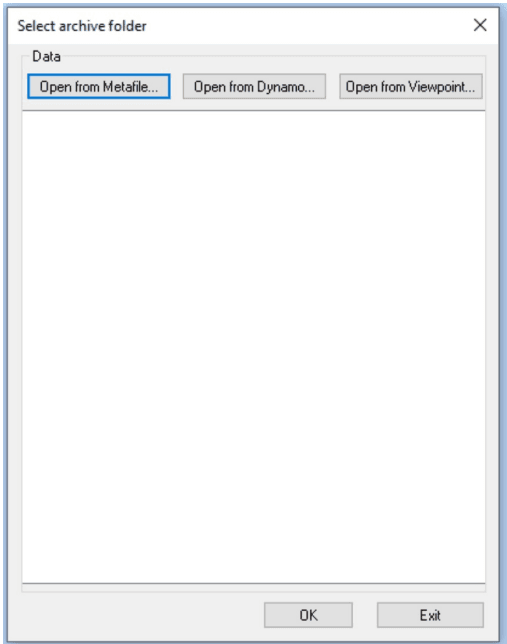
It creates indextype 3, see above, for all existing fields in the selected Dynamo folder. Except for the JOBID, DOCID and XMLDATA which are ignored since they are protected fields and created by the MetaEngine during document creation.
EXAMPLES AFTER FIELD FETCH:
-
JScript
//Fields with default values or nullable: AddIndex("3","PRINTSTATUS",GetValue("PRINTSTATUS")); //DataType; long Nullable AddIndex("3","PRINTOUTJOBID",GetValue("PRINTOUTJOBID")); //DataType; long Nullable AddIndex("3","ARCHIVESTATUS",GetValue("ARCHIVESTATUS")); //DataType; long Nullable AddIndex("3","ARCHIVEOUTJOBID",GetValue("ARCHIVEOUTJOBID")); //DataType; long Nullable AddIndex("3","COMPLETEDATE",GetValue("COMPLETEDATE")); //DataType; long Nullable AddIndex("3","CUSTOMERNAME",GetValue("CUSTOMERNAME")); //DataType; str Length: 60 Nullable AddIndex("3","CUSTOMERADR",GetValue("CUSTOMERADR")); //DataType; str Length: 60 Nullable AddIndex("3","CUSTOMERZIPCODE",GetValue("CUSTOMERZIPCODE")); //DataType; str Length: 8 Nullable AddIndex("3","CUSTOMERCITY",GetValue("CUSTOMERCITY")); //DataType; str Length: 60 Nullable AddIndex("3","CUSTOMERNO",GetValue("CUSTOMERNO")); //DataType; str Length: 60 Nullable -
VBScript
'Fields with default values or nullable:
AddIndex "3","PRINTSTATUS",GetValue("PRINTSTATUS") 'DataType; long Nullable
AddIndex "3","PRINTOUTJOBID",GetValue("PRINTOUTJOBID") 'DataType; long Nullable
AddIndex "3","ARCHIVESTATUS",GetValue("ARCHIVESTATUS") 'DataType; long Nullable
AddIndex "3","ARCHIVEOUTJOBID",GetValue("ARCHIVEOUTJOBID") 'DataType; long Nullable
AddIndex "3","COMPLETEDATE",GetValue("COMPLETEDATE") 'DataType; long Nullable
AddIndex "3","CUSTOMERNAME",GetValue("CUSTOMERNAME") 'DataType; str Length: 60 Nullable
AddIndex "3","CUSTOMERADR",GetValue("CUSTOMERADR") 'DataType; str Length: 60 Nullable
AddIndex "3","CUSTOMERZIPCODE",GetValue("CUSTOMERZIPCODE") 'DataType; str Length: 8
Nullable
AddIndex "3","CUSTOMERCITY",GetValue("CUSTOMERCITY") 'DataType; str Length: 60 Nullable
AddIndex "3","CUSTOMERNO",GetValue("CUSTOMERNO") 'DataType; str Length: 60 Nullable
Using Archiveindex to set PDF properties
Use Addindex to set PDF properties Title, Author and Subject. PDF property can be any of the following types: “_DOCPROP_Title” sets property Title. “_DOCPROP_Author” set property Author. “_DOCPROP_Subject” set property Subject.
EXAMPLES:
-
JScript
AddIndex("3", "_DOCPROP_Title", "Document title"); -
VBScript
AddIndex "3", "_DOCPROP_Title", "Document title"
Error method
PrintError
PrintError(“ErrorType”, “ErrorText”)
Used to report a printout error to the error log during runtime. It can also stop processing of a batch job, or just abort a document. (For Batch documents)
| Parameter | Description |
|---|---|
| ErrorType | Can be any of WARNING|ERROR|ABORTJOB|ABORTDOC | WARNING = If you enter an unidentified error type. ERROR = General error. ABORTJOB = Job aborted. If batch then the whole job is aborted. ABORTDOC = Document aborted. If batch then the document is aborted. ErrorType can be a constant value, return value from function or variable. |
| ErrorText | ErrorText can be a constant value, return value from script or variable. |
EXAMPLES:
-
JScript
PrintError("ERROR", "A Severe error occurred. Stop!"); PrintError("WARNING", "A Warning error occurred. Inform and continue."); PrintError("ABORTJOB", "Stop job!"); PrintError("ABORTDOC", "Severe document error, but continue."); -
VBScript
PrintError "ERROR", "A Severe error occurred. Stop!"
PrintError "WARNING", "A Warning error occurred. Inform and continue."
PrintError "ABORTJOB", "Stop job!"
PrintError "ABORTDOC", "Severe document error, but continue."
Inserting document parts methods (found under Resources)
InsertDocument
InsertDocument(DocID)
Inserts a DocID of the document type in the document. An error occurs if the specified document DocID does not exist.
| Parameter | Description |
|---|---|
| DocID | Document to be inserted. Must exist in the MetaLogic file, use ExistsInMetaLogic() method to check if the document exist. DocID can be a constant value, return value from function or variable. |
EXAMPLES:
-
JScript
var vValue=GetValue("RECTYPE"); if (ExistsInMetaLogic("Document", vValue) ) // Insert the document if it exists InsertDocument(vValue); -
VBScript
Dim vValue
vValue=GetValue("RECTYPE");
if ExistsInMetaLogic("Document", vValue) then ' Insert the document if it exists
 InsertDocument vValue
end if
InsertGraphObject
InsertGraphObject(graphID)
Inserts a graphID of the business graphic type in the document. An error occurs if the specified graphic graphID does not exist.
| Parameter | Description |
|---|---|
| graphID | Business graphic to be inserted. Must exist in logicfile, use ExistsInMetaLogic() method to check if document exist. graphID can be a constant value, return value from function or variable. |
EXAMPLES:
-
JScript
var vValue=GetValue("GRAPH"); if (ExistsInMetaLogic("Graph", vValue) ) // Insert the graph if it exists InsertGraphObject(vValue); -
VBScript
Dim vValue
vValue=GetValue("GRAPH")
if ExistsInMetaLogic("Document", vValue) then ' Insert the graph if it exists
 InsertGraphObject vValue
end if
InsertImage
InsertImage(XmlString)
Inserts an image into the document. The image can be imported in the MetaLogic file or part of the data value. If the image is part of the data it must be in B64-encoded data stream.
| Parameter | Description |
|---|---|
| XmlString | XmlString is a structure containing a number of attributes that describes the image and position. XmlString can be a constant value, return value from function or variable. |
The following attributes make up the XmlString:
| OverlayName=‘Imagename’ | Mandatory: Can be empty if attribute ImageBody refers to the attribute containing image data is included, see below. |
| BodyFromAttr=‘ImageData’ | Optional: The name of the data attribute that contains the image in B64- encoded data stream. |
| Compression=‘Number’ | Optional: JPEG compression level, use for large images. |
| Mode=‘Number’ | Optional: If value is 1 (one) then the image will be placed locally in document instead of being stored as a common resource. |
| Static=‘Y/N | Mandatory: If value is ‘Y’ then the image will take a static location on the page. |
The other attributes work the same as for other resource, see chapter Texts - Common properties for Barcode, Line, Rectangle, Textbox and Image.
EXAMPLES:
-
JScript
var vXmlStr="<?xml version='1.0' encoding='UTF-16?>"; vXmlStr+="<Image X='25' Y='35' CX='40' CY='50' Height='50' OverlayName='' "; vXmlStr+="BodyFromAttr='The attribute name in data containing image data' "; vXmlStr+="Compression='30' Width='40' Mode='1' TakesPageHeight='N' Static='Y'/>"; InsertImage(vXmlStr); var vXmlStr="<?xml version='1.0' encoding='UTF-16?>"; vXmlStr+="<Image X='25' Y='35' OverlayName='MyLogo' "; vXmlStr+="Mode='1' TakesPageHeight='N' Static='Y'/>"; InsertImage(vXmlStr); -
VBScript
Dim vXmlStr
vXmlStr = "<?xml version='1.0' encoding='UTF-16?>" & _
"<Image X='25' Y='35' CX='40' CY='50' Height='50' OverlayName='' " & _
"BodyFromAttr='The attribute name in data containing image data' " & _
"Compression='30' Width='40' Mode='1' TakesPageHeight='N Static='Y'/>"
InsertImage vXmlStr
vXmlStr = "<?xml version='1.0' encoding='UTF-16?>" & _
"<Image X='25' Y='35' CX='40' CY='50' " & _
"Mode='1' TakesPageHeight='N' Static='Y'/>"
InsertImage vXmlStr
InsertObject
InsertObject(ObjectID)
Inserts a form object type into the document. An error occurs if the specified form objectID does not exist.
| Parameter | Description |
|---|---|
| ObjectID | The object (the form) to be inserted. Must exist in MetaLogic file, use ExistsInMetaLogic() method to check if document exist. ObjectID can be a constant value, return value from function or variable. |
EXAMPLES:
-
JScript
var vXmlStr="<?xml version='1.0' encoding='UTF-16?>"; vXmlStr+="<Image X='25' Y='35' CX='40' CY='50' Height='50' OverlayName='' "; vXmlStr+="BodyFromAttr='The attribute name in data containing image data' "; vXmlStr+="Compression='30' Width='40' Mode='1' TakesPageHeight='N' Static='Y'/>"; InsertImage(vXmlStr); var vXmlStr="<?xml version='1.0' encoding='UTF-16?>"; vXmlStr+="<Image X='25' Y='35' OverlayName='MyLogo' "; vXmlStr+="Mode='1' TakesPageHeight='N' Static='Y'/>"; InsertImage(vXmlStr); -
VBScript
Dim vXmlStr
vXmlStr = "<?xml version='1.0' encoding='UTF-16?>" & _
"<Image X='25' Y='35' CX='40' CY='50' Height='50' OverlayName='' " & _
"BodyFromAttr='The attribute name in data containing image data' " & _
"Compression='30' Width='40' Mode='1' TakesPageHeight='N Static='Y'/>"
InsertImage vXmlStr
vXmlStr = "<?xml version='1.0' encoding='UTF-16?>" & _
"<Image X='25' Y='35' CX='40' CY='50' " & _
"Mode='1' TakesPageHeight='N' Static='Y'/>"
InsertImage vXmlStr
InsertText
InsertText(TextID) Inserts a text fragment in the document. An error occurs if the specified text ObjectID does not exist.
| Parameter | Description |
|---|---|
| TextID | Text fragment to be inserted. Must exist in the MetaLogic file, use ExistsInMetaLogic() method to check if document exist. TextID can be a constant value, return value from function or variable. |
EXAMPLES:
-
JScript
var vValue=GetValue("TEXT"); if (ExistsInMetaLogic("Text", vValue) ) // Insert the text if it exists InsertText(vValue); -
VBScript
Dim vValue
vValue=GetValue("TEXT")
if ExistsInMetaLogic("Text", vValue) then ' Insert the text if it exists
 InsertText vValue
end if
Miscellaneous methods
ExistsInMetaLogic
ExistsInMetaLogic(Type, ObjectID).
Returns a boolean value (true=1, false=0) if ObjectID of the type Type present in the logicfile.
| Parameter | Description |
|---|---|
| Type | Type of object (Document, Text, Format, Graph, Form). Type can be a constant value, return value from function or variable. |
| ObjectID | Object identity. ObjectID can be a constant value, return value from function or variable. |
EXAMPLES:
-
JScript
if (ExistsInMetalogic("Form", "GIRO") ) // does formID exists? InsertObject("GIRO"); if (ExistsInMetalogic("Text", "TXT199") ) // does textID exists? InsertText("TXT199"); if (ExistsInMetalogic("Document", "SUBDOCUMENT") ) // does documentID exists? InsertDocument("SUBDOCUMENT"); if (ExistsInMetalogic("Graph", "PIEGRAPH") ) // does graphID exists? InsertGraphObject("PIEGRAPH"); -
VBScript
if ExistsInMetalogic("Form", "GIRO") then ' does formID exists?
 InsertObject vValue
end if
if ExistsInMetalogic("Text", "TXT199") then ' does textID exists?
 InsertText "TXT199"
end if
if ExistsInMetalogic("Document", "SUBDOCUMENT") then ' does documentID exists?
 InsertDocument "SUBDOCUMENT"
end if
if ExistsInMetalogic("Graph", "PIEGRAPH") then ' does graphID exists?
 InsertGraphObject "PIEGRAPH"
end if
GetPhrase
GetPhrase(PhraseID, Language)
Returns the phrase id´s string value for language. Both arguments must be given. A blank value is returned if either phrase id or language don´t exist in the MetaLogic file.
| Parameter | Description |
|---|---|
| PhraseID | Existing phrase id, see chapter 23 Phrases. PhraseID can be a constant value, return value from script or variable. Language can be a constant value, return value from script or variable. |
EXAMPLES:
-
JScript
var vPhrase = GetPhrase("Phrase001", "Eng"); ReturnValue(vPhrase); -
VBScript
Dim vPhrase
vPhrase = GetPhrase("Phrase001", "Eng")
ReturnValue vPhrase
SetPhraseLanguage
SetPhraseLanguage(CurrentLanguage, DefaultLanguage)
Sets current language for phrases. Both arguments must be given. If Current language is set to a nonexisting id, the Default language is used. GetPhrase method is affected by this method.
| Parameter | Description |
|---|---|
| CurrentLanguage | Language id, see chapter Phrases. CurrentLanguage can be a constant value, return value from function or variable. |
| DefaultLanguage | Language id, to be used as default. DefaultLanguage can be a constant value, return value fromfunction or variable. |
EXAMPLES:
-
JScript
var vLang = "Eng"; var vDef = "Swe"; SetPhraseLanguage(vLang, vDef); -
VBScript
Dim vLang
Dim vDef
vLang = "Eng"
vDef = "Swe"
SetPhraseLanguage vLang, vDef
SetKeepOnMin
SetKeepOnMin(MinSize)
Sets the minimum percent value that must be written on the page body before causing break to a new page.
| Parameter | Description |
|---|---|
| MinSize | A whole numeric value. MinSize can be a constant value, return value from function or variable. |
EXAMPLES:
-
JScript
SetKeepOnMin("80"); -
VBScript
SetKeepOnMin "80"
StoreText
StoreText(DXMLText, ID)
Is used to store texts in memory. The text must be in DXML format and after it has been loaded it can be inserted using the InsertText method.
| Parameter | Description |
|---|---|
| DXMLText | DXML string. DXMLText can be a constant value, return value from function or variable. |
| ID | The ID for the stored text. ID can be a constant value, return value from function or variable. |
EXAMPLES:
-
JScript
var Connect = "DSN=ODBCName;"; var Rs1 = new ActiveXObject("ADODB.Recordset"); Rs1.Open( Source, Connect ); var vTextID; var vID; while (!Rs1.EOF) { vTextID = Rs1(0).value; vID="_T_" + vTextID ; //Concat ID to ensure it will be unique if (!IsTextStored(vID)) // check if it is already loaded { vValue= Rs1(1).value; if (vValue!=null) StoreText(vValue ,vID); } Rs1.MoveNext(); // move on to the next record } Rs1.Close(); -
VBScript
Dim Connect, Rs1, vTextID, vID
Connect = "DSN=ODBCName;"
Set Rs1 = CreateObject("ADODB.Recordset")
Rs1.Open( source, connect)
while not Rs1.EOF
 vTextID = Rs1(0).value
 vID="_T_" & vTextID ' Concat ID to ensure it will be unique
 if not IsTextStored(vID) then ' check if it is already loaded
 vValue = Rs1(1).value
 if vValue <> null then
 StoreText(vValue ,vID)
 end if
 end if
 Rs1.MoveNext ' move on to the next record
wend
Batch application
In a MetaBatch flow application can be controlled with or without a file type script. A file type script control what happens after a document has been created but before it is written to a file(s).
Without file type script:
The following methods could be used in the normal MetaLogic processing in an execute script.
| Function | Explanation |
|---|---|
| PrintSeparatorPage | Prints any separator page in printout file. |
| SetBaseFileName | Defines the name (or part of) printout file. |
| SkipDocument | Skips printing of the current document. Instead it continues with the next. |
With file type script
When a file type script is used in a batch parameter file then all batch methods could be of interest or use.
When the document has been formatted but before it is written to a printout file, Metaforce batch then gives you the chance to select which file(s) the document should be written to. You can also decide if a separator page should be written, if the document should be splitted, and/or what name the file should have.
In the MetaBatch paramater file you have the possibililty to create one or more output file type ID’s. The file type is “selected” by creating a file type script in the MetaLogic file, and is then selected as file type script in the batch parameter, see the MetaBatch manual for more information.
The file type’s role is to select where your printout of the current document should be placed. Methods exist to query how many pages/sheets the current document have. You can also save the current document in memory for document that should be processed as a set. Therefore methods exists to query how many pages/sheets/documents that are saved. File types can be used to save printout files in different formats (AFP, PDF, PPML etc) or if they should be processed in different envelopes (C4, C5) etc.
Note that some method calls only sets “flags” to the printout command and therefore must be coded in “delayed mode”. The methods are PrintSeparatorPage, SetBaseFileName, and SplitDocument.
Printout to file happens when file type script returns a value, via the ReturnValue method, that matches a file type ID, of the current document directly or when you use SaveDoc and using the PrintSaved to select what file type ID or IDs.
After the final document has been created, and if any saved documents exists in memory, a final call to the file type script is made. This makes it possible to decide where the saved documents should be placed.
Batch methods
Methods that can be used in MetaBatch applications.
AddDocument
AddDocument(Document, FirstLast)
Adds a document in the saved area, either at the top (first) or at the bottom (last). It is used together with SaveDoc() method.
| Parameter | Description |
|---|---|
| Document | Document ID to be added. Document can be a constant value, return value from function or variable. |
| FirstLast | Valid values are: First or Last. FirstLast can be a constant value, return value from function or variable. |
EXAMPLES:
-
JScript
if (gPrevious!=gCurrent) // previous customer number not equal to current { AddDocument("STARTSEP", "First"); AddDocument("END_SEP", "Last"); } -
VBScript
if gPrevious<>gCurrent then ' previous customer number not equal to current
 AddDocument "STARTSEP", "First"
 AddDocument "END_SEP", "Last"
end if
GetCounter
GetCounter(Type)
Returns a number of type along with a counter of the type described below.
Type of counter.
Current document
- DocCount, returns number of documents created.
- SheetCount, returns number of sheets created.
Crashnumber
- JobCount, returns number of pages created.
Saved document
- SavedDocs, returns number of saved documents, used in file type script that uses SaveDoc().
- SavedSheets, returns number of sheets for saved documents.
- SavedPages, returns number of pages for saved documents.
Type can be a constant value, return value from function or variable.
EXAMPLES:
-
JScript
var vDocs = GetCounter("DocCount"); var vSheets = GetCounter("SheetCount"); var vJob = GetCounter("JobCount"); var vSaveDocs = GetCounter("SavedDocs"); var vSavedSheets = GetCounter("SavedSheets"); var vSavedPages = GetCounter("SavedPages"); if (vSaveDocs>0 ) // Send any remaining document to the print file PrintSaved(gCurrent); // current active filetype ID -
VBScript
Dim vDocs, vSheets, vJob, vSaveDocs, vSavedSheets, vSavedPages
vDocs = GetCounter("DocCount")
vSheets = GetCounter("SheetCount")
vJob = GetCounter("JobCount")
vSaveDocs = GetCounter("SavedDocs")
vSavedSheets = GetCounter("SavedSheets")
vSavedPages = GetCounter("SavedPages")
if vSaveDocs>0 then ' Send any remaining document to the print file
 PrintSaved gCurrent ' current active filetype ID
end if
PrintSaved
PrintSaved(FileType)
Prints the saved document from memory, saved in memory by SaveDoc(), to a file of the file type which is set up in MetaBatch. If the parameter is omitted the first defined file type in MetaBatch is selected.
| Parameter | Description |
|---|---|
| FileType | The file type ID of file to be printed. FileType can be a constant value, return value from function or variable. |
EXAMPLES:
-
JScript
var vCurrSheets=GetCounter("SheetCount"); var vSavedSheets=GetCounter("SavedSheets"); if (vCurrSheets==0) // We are at the last iteration... { if (vSavedSheets>0) // Print any remaining saved documents... { PrintSaved(gPrevPrtFile); // gPrevPrtFile, global variable defined under GLOBAL } ReturnValue(gPrevPrtFile); return; } -
VBScript
Dim vCurrSheets, vSavedSheets
vCurrSheets=GetCounter("SheetCount")
vSavedSheets=GetCounter("SavedSheets")
if vCurrSheets=0 then ' We are at the last iteration...
 if vSavedSheets>0 then ' Print any remaining saved documents...
 PrintSaved gPrevPrtFile ' gPrevPrtFile, global variable defined under GLOBAL
 end if
 ReturnValue gPrevPrtFile
 exit sub
end if
PrintSeparatorPage
PrintSeparatorPage()
Writes a separator page. Used in MetaBatch applications, it causes a stop in a insetting machine. Which separator page is used is specified in the batch parameter file.
EXAMPLES:
-
JScript
PrintSeparatorPage(); -
VBScript
PrintSeparatorPage
ReRunDocument
ReRunDocument()
Is used to create a new document using the same data as the previous. This means that the running document is called again from the start using the same data. The running document must keep track of each call that has been made by using a counter.
ReRunDocument can be called maximum twenty times by default to avoid loops. This maximum can be changed in the MaxRerun input field, in the batch parameter. For more information see the MetaBatch Manual.
EXAMPLES:
-
JScript
var vCnt = GetValue("LOC_Counter"); if (vCnt == "") // initialize first time g_Counter=0; if (g_Counter<1) { InsertDocument("DOC1"); g_Counter=1; ReRunDocument(); // Start again using the same data } else { InsertDocument("DOC2"); g_Counter=0; // Important to reset global variable to avoid loops! } SetValue("LOC_Counter",g_Counter); -
VBScript
Dim vCnt
vCnt = GetValue("LOC_Counter")
if vCnt = "" then g_Counter=0 ' initialize first time
if g_Counter<1 then
 InsertDocument "DOC1"
 g_Counter=1
 ReRunDocument ' Start again using the same data
else
 InsertDocument "DOC2"
 g_Counter=0 ' Important to reset global variable to avoid loops!
end if
SetValue "LOC_Counter", g_Counter
ReturnValue
ReturnValue(“Value”)
Print out the current document to a print file(s) file type ID. Same parameters as for PrintSaved method, for more information see PrintSaved.
EXAMPLES:
-
JScript
var vCurrSheets=GetCounter("SheetCount"); if (vCurrSheets<10) // a small document, use C5 letters ReturnValue("C5"); else ReturnValue("C4"); -
VBScript
Dim vCurrSheets
vCurrSheets=GetCounter("SheetCount")
if vCurrSheets<10 then ' a small document, use C5 letters
 ReturnValue "C5"
else
 ReturnValue "C4"
end if
SameEnvelope
Prints the generated document to the same envelope, default is to print to a new envelope for each generated document. Is used in MetaBatch application in a file type script, see MetaBatch Manual for more information. It must be executed before ReturnValue method. See also ReturnValue() method.
EXAMPLES:
-
JScript
var vCurrent=GetValue("ControlID"); if (vCurrent==gCurrent) // Shall be put in same "basket" SameEnvelope(); ReturnValue("C4"); -
VBScript
Dim vCurrent
vCurrent=GetValue("ControlID");
if vCurrent=gCurrent then ' Shall be put in same "basket"
 SameEnvelope
end if
ReturnValue "C4"
SaveDoc
SaveDoc()
Saves the created document in memory. Is used in the MetaBatch application in a file type script, see MetaBatch Manual for more information. See also PrintSaved() method.
EXAMPLES:
-
JScript
var vCurrent=GetValue("ControlID"); if (vCurrent==gCurrent) // Shall be put in same "basket" SaveDoc(); else PrintSaved("C4"); -
VBScript
Dim vCurrent
if (vCurrent==gCurrent) // Shall be put in same "basket"
 SaveDoc
else
 PrintSaved "C4"end if
SetBaseFileName
SetBaseFileName(BaseName)
| Parameter | Description |
|---|---|
| BaseName | File name of the output file. BaseName can be a constant value, return value from function or variable. |
EXAMPLES:
-
JScript
var vValue=GetValue("Meta_CurrentInFileName"); SetBaseFileName(vValue); -
VBScript
Dim vValue
vValue=GetValue("Meta_CurrentInFileName")
SetBaseFileName vValue
SkipDocument
SkipDocument()
Skips printing of the current document. Instead it continues with the next. This method can be used in a file type script or in an execution script. Note: If used with ReRunDocument it can cause unexpected results.
EXAMPLES:
-
JScript
SkipDocument(); -
VBScript
SkipDocument
SplitDocument
SplitDocument(“FirstEnv”, “NextEnv”)
Splits a document in several envelopes after a specified number of pages. An address document must be selected in the MetaBatch parameter. For more information see the MetaBatch Manual. SplitDocument can be used in a file type script or in an execution script.
| Parameter | Description |
|---|---|
| FirstEnv | Number of pages in the first section. FirstEnv can be a constant value, return value from function or variable. |
| NextEnv | Number of pages in the last section. NextEnv can be a constant value, return value from function or variable. |
EXAMPLES:
-
JScript
SplitDocument("35", "40"); -
VBScript
SplitDocument "35", "40"
Functions
A function is a piece of script code, which executes a required operation. Functions can be called from scripts or other functions. A function can have input parameters and return values. A good candidate for a function is a piece of script code occurring twice or several times in the script code. Apart from the differences below, functions work out in the same way as scripts, see chapter Scripts.
Own functions can be opened by double-clicking on the function in a script-/function editor. User written functions are given their own color which can be changed to a color of your own choice, see Preferences.
To add a function you select Edit/Functions… See chapter Generic list dialog.
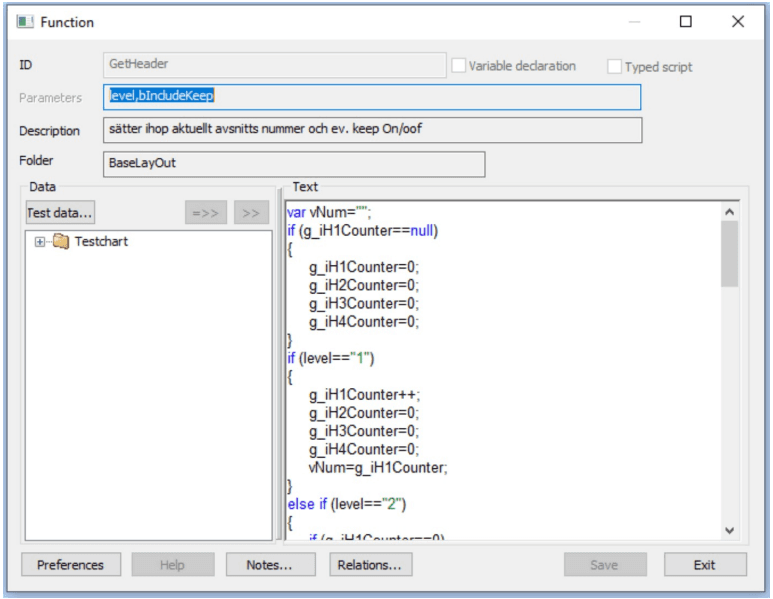
| Function | Explanation |
|---|---|
| ID | Is only possible to set for a new function. The identification of the function MUST be made up by alphanumeric values (0-9, a-z, A-Z) and “underscore” (_) only. ID cannot start with a number, and must not contain spaces. |
| Variable declaration | If you check this box the script code is used as an global variable declaration instead of a ordinary function and the Parameters field will be disabled. See chapter Script - Function global variable declaration. |
| Typed Script | If you check this box the script code will be available as a TypedScript. See chapter Data types. Parameters will be protected and four parameters will be added automatically, they are vExParam, vAttributeName, vAttributeValue, and vCurrLocaleID. vExParam - Contains the value that can be passed to the TypedScript function vAttributeName - Contains the field attribute name vAttributeValue - Contains the value from the fields attribute vCurrLocaleID - Contains the LocaleID that is used, is taken from Prases language settings. |
| Parameters | The functions parameters, according to the syntax used by the Scripting Engine (JScript/VBScript). |
| Description | A text describing the function. |
| Folder | Set the search path in the function tree. |
| Test data | Offers the option to select test data. See chapter Test data. To enter a variable in the script editor, mark the required variable from the test data tree and press [>>]. |
| Preferences | Here you can set the color for variables, text strings and comments in the editing window. Click the number in the first column and select color. Furthermore you can select font size and type face for the characters in the text window. See Script preferences - dialog under the chapter Scripts. |
| Return value | To return a value from the function you enter in the end of the script code |
To return a value from the function you enter in the end of the script code
EXAMPLES:
-
JScript
result = "OK";
return result;
To return a value back from a VBScript function the value must be assigned to the name of the function, see below for an example.
-
VBScript
result = "OK"
functionname = result
Function global variable declaration (For Batch documents)
When field ‘Variable declaration’ is checked the script code will be used as an global variable declaration instead of a ordinary function. All variables declared in code marked as ‘Variable declaration’ can be reached from both functions and scripts. This can be useful when you need script counters or want to create an global instance of ActiveX/COM components.
When creating multiple variable declaration objects, either by creating multiple variable declaration objects in same MetaLogic file or project, or from the inheritance mechanism found in Solutions and thereby getting different variable declarations from all active in MetaLogic file or project. These will be merged at runtime into one global variable declaration. This can cause compilation errors if multiple declaration for the same variable exists. Care must be taken to avoid this if multiple variable declaration definition objects are used.
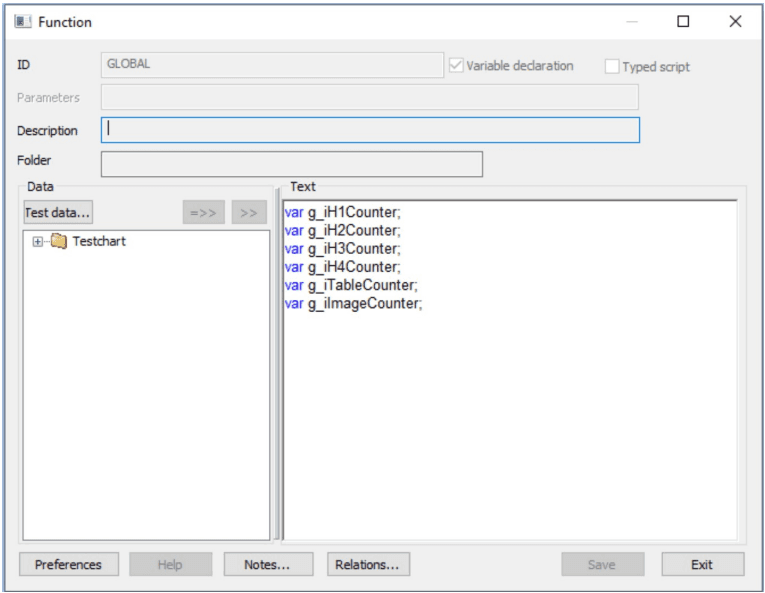
All functionality are the same as in the Function dialog.