Pages
Note: The URLs referenced throughout this page point to Production. If you’re integrating against Sandbox or Staging, use your environment’s equivalent host instead of copying these values directly - check with your Doxis contact if you’re unsure of the exact host for your environment.
Overview
The Pages module is a suite of programs that proves streamlined document production (print/PDF) for high volumes and on-demand needs, using data from all your business systems. It enables object-oriented and dynamic template development with the Metatool application for quick deployment and easy maintenance without IT intervention.
Pages Architecture
The frontend is a React application and the backend is a ASP .NET Core application. The React application and Pages api communicate with the Interact SOAP api as the backing services. All applications are running in containers.
Services
The services exposed by the Pages api will give the client system a good opportunity to give the organization a great experience in creating and distributing written communication in an efficient way.
The services can be grouped into three categories:
-
Interactive document editing and management
-
Ondemand document creation
-
Distribution and post processing
Regarding the interactive use case the Editor is a lightweight browser based editor which allows the user to edit the document instance as a web document before approving and distributing it. See Editor documentation for more information.
Performance and caching
To maximize performance, Pages API configurations retrieved from the Doc Gen APIs are cached with a timeout of 10 minutes. Caching balances optimization with the ability to update configurations. Any configuration change takes effect when the cache expires or immediately if the object was not previously cached.
Limitations
To prevent service overload, the system enforces size limits on the following items:
- Generated DXML file (generated when initializing an Editor session): Maximum size of 6.68 MB
- Individual PDF attachment (uploaded by case handler): Maximum size of 1 MB
- Total size of all PDF attachments as Archive XML: Combined maximum of 28.61 MB
The size of the generated DXML for a specific document template can easily be tested by the document developer by printing from Metatool, selecting the DXML_WEB output channel, and then checking the file size of the resulting XML file.
These limitations are in place to help users understand the allowable sizes for different items, ensuring smooth and reliable operation within the system.
Data retention policies
Data stored for editing will be retained for 5 days as default. This is however configurable.
Data stored in the Pages/Interact Dynamo will be retained up to the point when the batch is run. This period is usually configured to be no more than 24 hours.
Security
For general security of getting access tokens to access the Pages api, please refer to the REST API documentation.
Extra Editor security - JWT Authentication
As an added security concerning Editor one can configure the Editor environment to require a JWT Authentication when opening an Editor session. The generated JWT exchange token is valid for a short period of time and is received when a new Editor session is created. The JWT exchange token is replaced by a proper session token by the React client in the initial phase. A JWT exchange token can be retrieved later on if one wants to open an older Editor session. Note that Require JWT Authentication can be configured per environment. The enhanced Editor security is a good thing since it makes sure that only users of your system can access your active document instances.
JWT token lifecycle
The JWT authentication flow follows an exchange token pattern with two distinct token types:
1. Exchange token (short-lived)
When a new Editor session is created via the Pages API, a JWT exchange token is generated and returned alongside the StartURL.
This exchange token is valid for 30 seconds and is tied to the specific document instance (via the start parameter).
The client appends this token to the StartURL as a query parameter (?jwt=<token>) when opening the Editor.
2. Session token (long-lived)
When the Editor is opened with a valid exchange token, the system automatically exchanges it for a session token. This happens transparently in the initial page load — the exchange token is validated and a new session token with a 24-hour validity is issued. The session token is returned to the client via a response header and is used for all subsequent requests during the editing session.
3. Session expiration
The session token expires after 24 hours from the time of issuance. There is no explicit logout or server-side session invalidation — the session is considered ended once the token expires. The token is cryptographically bound to the specific document instance, meaning a session token for one document cannot be used to access another.
Note that the document instance itself has a separate retention period (default 5 days, configurable), after which the instance and its data are cleaned up regardless of token validity.
A new exchange token can be retrieved at any time using the endpoint described in the section “Retrieving a new JWT token” below, for example to resume editing a document instance after the original session token has expired.
Integration - Editor
For a good technical documentation describing all the endpoints in the Pages api see the api documentation at https://webeditor.metaforce.net/documentation-api.
The OpenApi documentation can be downloaded and used in conjunction with Postman for a better understanding how the Pages apis work.
Client applications written in .NET can use the nuget package Metaforce.WebEditor.Api.Client that makes it even easier to integrate with the Pages api.
Interactive document editing and management
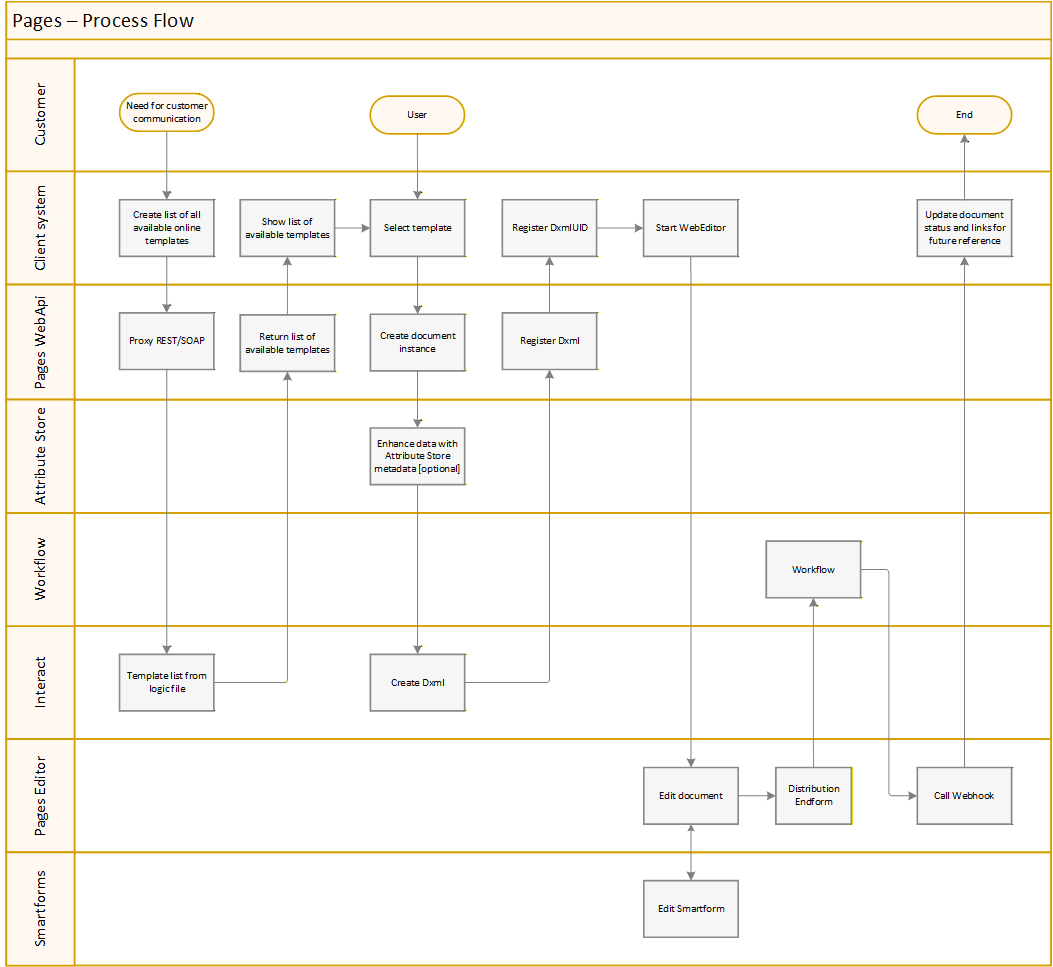
Listing all available online document templates
/{customerEnvironment}/onlinedocuments/{metafile}The client system makes a call to the Pages api to get a list of available online document templates in the specific logic file. The response contains a structure of templates where each document template can contain a list of keywords/tags that can be used to filter relevant templates in the context of the user.
Select template and initiate the Editor
/{customerEnvironment}/dxml/createThe user selects a template and the client system instantiates a document instance from the specific logic file together with XML data and an optional callback/webhook endpoint for the Editor to call once the document instance is completed.
The response contains the DxmlUID, the validTo, the StartURL and the JWT token (optional but recommended) to the specific document instance.
The client system should store the DxmlUID, StartURL and validTo to keep track of the specific document instance.
/{customerEnvironment}/dxml/create/jsondataCreates a document instance with JSON data (instead of XML).
JWT token
The client system uses the StartURL to initiate the Editor for the user. If the environment has “Require JWT Authentication” turned on one also has to append the query parameter “jwt=JWT token” to the URL.
Editing the document instance, select distribution channel and CallBack
The user edits the document and finally approves the document. This leads to the distribution endform where the user selects the distribution channel of choice to the receiving customer. If the document instance has been started with a defined callback a request will be made to the endpoint. A request will also be made if the user discards the document instance. The third reason for a webhook to be made is when the system does maintenance and deletes an instance that is in draft state.
CallBack format
The structure of the callback URL depends on the configured distribution scenario.
CallBack format - No distribution
In this scenario, the HTTP GET request will look like:
https://host.domain.net/03755a3e-bdbf-44ef-98b7-af89feb88644?Status=OK- 03755a3e-bdbf-44ef-98b7-af89feb88644 is the DxmlUID.
- Status=OK indicates that the process completed successfully and the document is ready.
- The Status parameter can also have the value Discarded to indicate user cancellation or Deleted to indicate that a document in Draft mode has been deleted by the system.
CallBack format - OmniChannel/MFDX distribution
In this scenario, the HTTP GET request will include additional parameters:
https://host.domain.net/03755a3e-bdbf-44ef-98b7-af89feb88644?Status=OK&Id=33755a3e-bdbf-44ef-98b7-af89feb88666&CorrelationId=93755a3e-bdbf-44ef-98b7-af89feb88655&Distribution=OnPremArchiving- Id: A customer-provided identifier (empty if not provided).
- CorrelationId: The correlation ID from OmniChannel/MFDX.
- Distribution: The selected distribution method (e.g., OnPremArchiving).
CallBack format - Dynamo
In this case, the HTTP GET request includes Dynamo specific identifiers:
https://host.domain.net/03755a3e-bdbf-44ef-98b7-af89feb88644?Status=OK&Id=33755a3e-bdbf-44ef-98b7-af89feb88666&JobId=12312&DocId=1&Distribution=CentralDistribution- JobId and DocId represent indexes from the Dynamo database.
- Other parameters follow similar meanings as above.
Retrieving a new JWT token
/{customerEnvironment}/dxml/jwt/{startParameter}Submit the startParameter (the last part of the StartURL) to retrieve a new JWT token.
The startParameter is the “x7bHmq…” in the sample below
https://webeditor.metaforce.net/WebEditor/x7bHmq...Client system checking document instance status
/{customerEnvironment}/status/{dxmlUID}/{customerEnvironment}/status/{customerEnvironment}/status/draft/{startUtcTime}/{endUtcTime}/{customerEnvironment}/status/ok/{startUtcTime}/{endUtcTime}The client system can use different methods to check the document instance status:
-
Using the callback/webhook attribute when initiating a document instance. The callback will be made once the user has approved the document instance. This process flow is more advanced but will enable a faster overall process.
-
Scheduled job that uses the endpoints to either check the specific document instance using the DxmlUID or the more generic endpoints to list all document instances in Draft or Ok status.
Document instance maintenance
The Pages service will maintain the created document instances and delete any instance older than 5 days or the configured number of days.
All data stored is encrypted according to best practices.
A document instance will be removes regardless if it has been published or not according to the configured retention period (or standard 5 days). If the document hasn’t been finalized and if a callback has been provided, the callback endpoint will receive a request with the document status “Deleted”. If one does a status search for a deleted DxmlUID the response will be 404 (NotFound).
Delaying instance deletion
If needed one can delay the deletion of a document instance by doing PUT with a datetime in the body to the endpoint below.
/{customerEnvironment}/dxml/{dxmlUID}Integration - On demand document creation
The Pages api exposes various endpoints to create OnDemand documents generated directly in the form of PDF, HTML, or MFDX formats.
The data to create the the document could either be in the DXML format or or in standard XML/JSON formats.
/{customerEnvironment}/pdf/createCreates a PDF from XML data.
/{customerEnvironment}/pdf/create/jsondataCreates a PDF from JSON data.
/{customerEnvironment}/pdf/createpreviewCreates a PDF with a Draft stamp from XML data.
/{customerEnvironment}/pdf/createpreview/jsondataCreates a PDF with a Draft stamp from JSON data.
/{customerEnvironment}/pdf/create/dxmlCreates a PDF from DXML data.
/{customerEnvironment}/html/createCreates an HTML from XML data provided that the Metafile has Content resources.
/{customerEnvironment}/html/create/jsondataCreates an HTML from JSON data provided that the Metafile has Content resources.
/{customerEnvironment}/html/create/dxmlCreates an HTML from DXML data provided that the Metafile has Content resources.
/{customerEnvironment}/mfdx/createCreates a MFDX file (or PDF with metadata) from XML data provided that the Metafile has Content resources. The MFDX format is a really simple format that contains PDF and metadata in XML format in one package. The file starts with 1 byte that reveals the format followed by a 4 byte long length indicator followed by the PDF bytes. This is followed by another 4 byte long length indicator and the XML in UTF8 encoding.
/{customerEnvironment}/mfdx/create/jsondataCreates a MFDX file from JSON data.
Integration - Distribution and post processing
The Pages API also exposes endpoints for document distribution. Documents can either be:
- Distributed instantly, or
- Stored in the Interact Dynamo database for postponed distribution and additional post-processing.
Using the Dynamo database, businesses can for instance cancel (“regret”) a distribution before the scheduled batch is executed.
Instant distribution
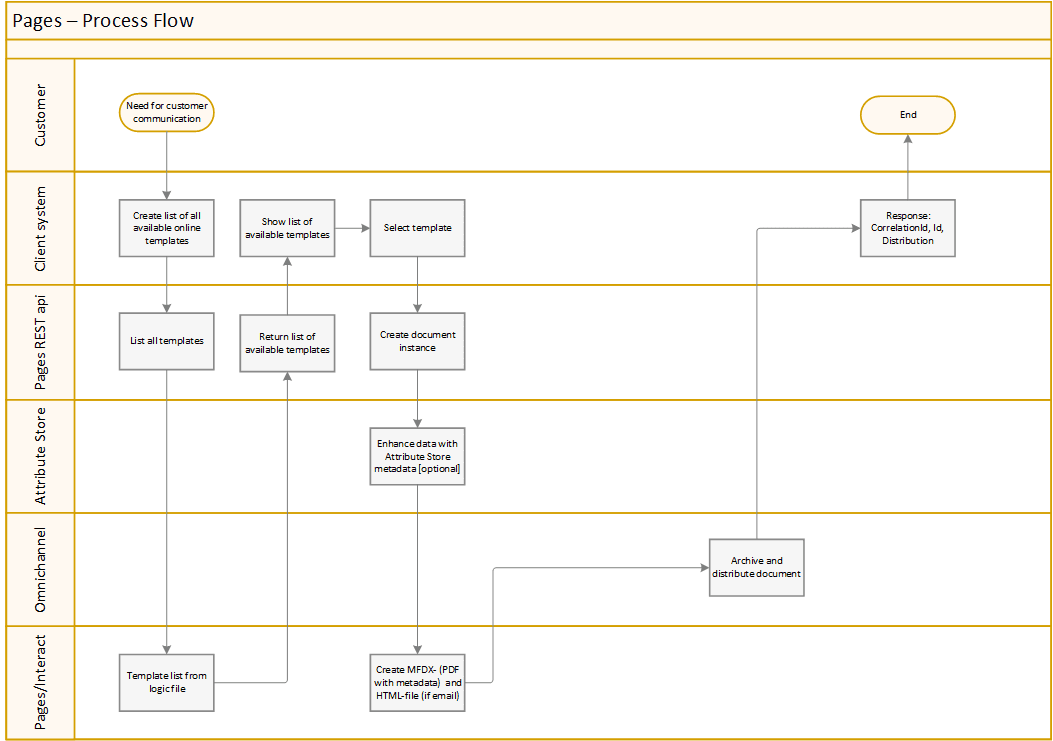
If configured for instant distribution, documents are immediately sent to the Omnichannel service for further processing.
This setup will enable:
- Archiving to an on-premise or Metaforce archiving service
- Distribution to a digital mailbox, PSP, or other central services
Post processing, postponed distribution
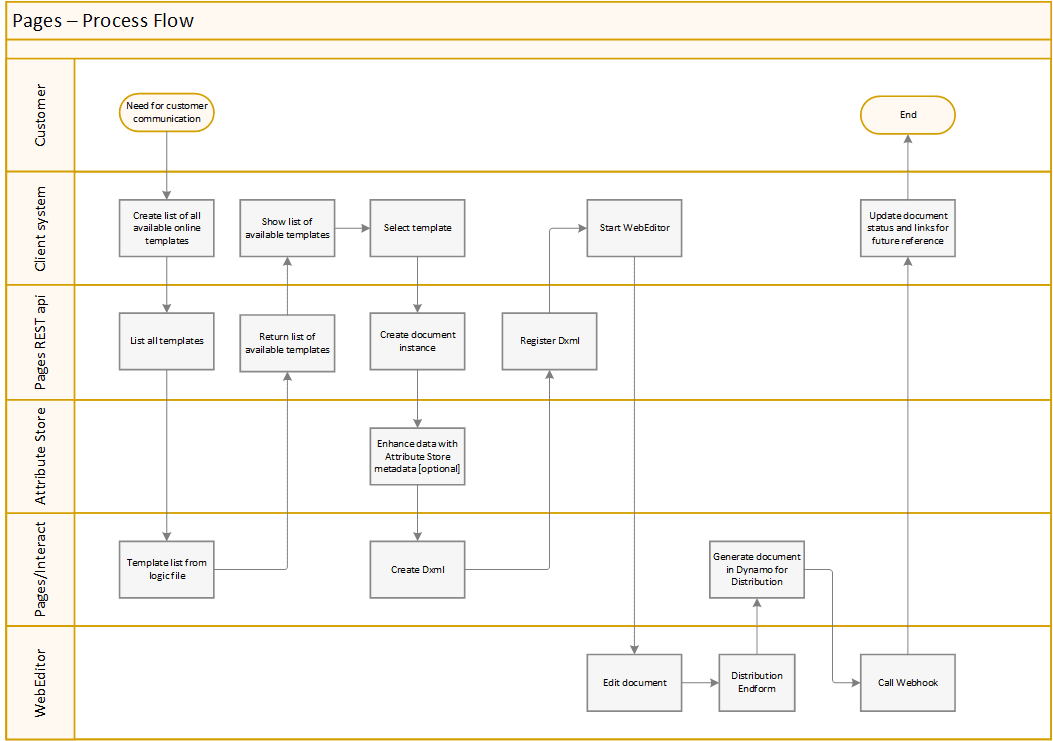
If configured for postponed distribution, documents are sent to the Interact Dynamo service for further post-processing and are finally distributed in a scheduled batch.
This setup will enable:
- The option to cancel distributions or alter metadata before the batch runs
- Archiving to an on-premise or Metaforce archiving service
- Distribution to a digital mailbox, PSP, or other central services
Post processing
A selected number of post processing services are described below. For a full list of services see the Pages api documentation at https://webeditor.metaforce.net/documentation-api. As you can see these endpoints exposes all CRUD operations against a Dynamo database.
/{customerEnvironment}/dynamo/createCreates a document in the Dynamo database from XML data.
/{customerEnvironment}/dynamo/create/jsondataCreates a document in the Dynamo database from JSON data.
/{customerEnvironment}/dynamo/searchSearches the Dynamo according to the posted search model. The response will contain the document metadata based on the defined database schema in the Dynamo including the JOBID/DOCID. The JOBID/DOCID can be used for RUD operations (Read, Update, Delete).
/{customerEnvironment}/dynamo/pdf/{jobid}/{docid}Gets the document as PDF.
/{customerEnvironment}/dynamo/mfdx/{jobid}/{docid}Gets the document as MFDX.
/{customerEnvironment}/dynamo/html/{jobid}/{docid}Gets the document as HTML (provided that the Metafile has Content resources).
Distribution endpoints
There are 4 endpoints specifically for doing distribution:
/{customerEnvironment}/distribute/send/{customerEnvironment}/distribute/send/jsondataCreates a document that is distributed according to the configured setup with either XML or JSON data.
/{customerEnvironment}/distribute/idempotent/send/{customerEnvironment}/distribute/idempotent/send/jsondataCreates a document that is distributed idempotently according to the configured setup with either XML or JSON data.
As one can see in the URL-path, two of those endpoints are protected with an idempotency service. As everything, there’s an evolutionary development as new needs are discovered…
Error codes
Here’s a list of errors that the Pages api can generate. The errors are translated into Norwegian or Swedish if the Editor has been configured to do so. Default language is English.
Integers surrounded by curly brackets ({0}) are dynamic variables replaced by the Pages api service.
| Error |
|---|
| (001) Invalid DXML file |
| (002) Invalid DXML UID |
| (003) Cannot find DXML file |
| (004) Cannot find DXML file {0} |
| (005) Error missing image in resourcenode |
| (006) Error missing attributes in image |
| (007) Empty company id |
| (008) Failed to get company id. {0} |
| (009) Failed to encrypt data. {0} |
| (010) Failed to decrypt data {0} |
| (011) Unable to parse base64 string with data |
| (012) Unable to parse base64 string with attachments |
| (013) Unable to parse xml with data |
| (014) Unable to parse xml with attachments |
| (015) Unable to parse json with data |
| (016) Unable to parse json with attachments |
| (017) The request contains an invalid number of dxmlUIDs, it must be greater than 0 and no more than 50 |
| (018) Invalid search datetime {0} {1} |
| (019) Could not create Interact SOAP Client for the environment: {0} |
| (020) Failed to get Editor configuration from CenterPoint for the environment: {0} |
| (021) Invalid DXML file, failed to create document as HTML |
| (022) Invalid scope ‘{0}’ for the environment {1} |
| (023) Failed to write audit log {0} |
| (024) Audit client not available |
| (025) Failed to create a valid URI from {0} |
| (026) Failed to do callback {0} |
| (027) Document {0} has Keyword ‘AttributeStoreKey={1}’ defined but it is not defined in the Centerpoint Attribute Store for environment ‘{2}‘ |
| (028) Failed to get attribute store document (AttributeStoreKey={0}) for the environment {1}. {2} |
| (029) Failed to get attribute store documents for the environment {0}, {1} |
| (030) The document can not be saved because it has been updated by others. Please click F5 to reload the document. |
| (031) Failed to distribute document {0} |
| (032) DocumentWithIndexes is null |
| (033) Empty Index in the DXML file |
| (034) Invalid Distribution Index in the DXML file (DISTRIBUTION) |
| (035) Empty Distribution Index in the DXML file (DISTRIBUTION) |
| (036) Either SSN or VAT Index must have a value |
| (037) Empty Arch_Folder Index in the DXML file (Arch_Folder) |
| (038) Empty Viewpoint RetentionPolicy (VPP.RETENTIONPOLICY) |
| (039) Empty Viewpoint Schema (VPP.SCHEMA) |
| (040) Empty Subject (SUBJECT) |
| (041) Empty Country (COUNTRY) |
| (042) Could not parse {0} as a valid country [SE, NO, DK]! |
| (043) Empty Viewpoint Distribution Attribute (VPP.DISTRIBUTIONATTRIBUTE) |
| (044) Invalid Viewpoint Metadata Attribute (VPP.METADATA) |
| (045) Failed to get ViewPoint connection from CenterPoint for the environment |
| (046) Cannot currently process Digital mailbox logic for Country: {0}! |
| (047) LookupResultViewModel is null! There is probably a problem with the configuration in MFDX and the LookupWorkflow for your organisation number… |
| (048) Distribution {0} is currently unhandled! |
| (049) The file is invalid! The byte position is:{0}. The length-field indicates that the area is {1} bytes when there’s {2} bytes left in the file… |
| (050) Missing attribute:{0} |
| (051) Cannot find Viewpoint Schema (VPP.SCHEMA) ‘{0}‘ |
| (052) Invalid Viewpoint Schema {0}. |
| (053) MetaEngine error {0} |
| (054) Cannot parse MetaEngine return {0} |
| (055) Viewpoint error {0} |
| (056) Internal error. Contact support! |
| (056) Problems deserializing the Dynamo folder: {0} |
| (057) Failed to get environments from Interact Admin. {0} |
| (058) Failed to get published attachment |
| (059) Failed to validate distribution model ‘{0}‘ |
| (060) Failed to get Interact General Settings from CenterPoint: {0} |
| (061) Failed to get Editor configuration from Interact Admin for the environment: {0} |
| (062) Failed to get retention policy from CenterPoint |
| (063) Failed to get Viewpoint Archive settings from CenterPoint |
| (064) Failed to get public Viewpoint connection from CenterPoint |
| (065) Failed to get Viewpoint connection from CenterPoint for the environment: {0} |
| (066) Failed to execute pre process from Workflow: {0} |
| (067) Failed to get processes from Pages manager: {0} |