SMS and Email Notifications
Smartform template supports notifications by SMS and Email.
Both can be configured with templates containing placeholders that will automatically be replaced with dynamic values (e.g., recipient name, Smartform URL).
Creating or Editing a Template
When editing a template (see screenshot example):
- Template Name – Internal name for the template.
- Event – The type of notification (e.g., Security Code, Notification, Reminder).
- Language – Language used for the message.
- Subject – (Email only) Required field for all email templates.
- Body Format – Choose between HTML or Text.
- Message – The body of the SMS/Email. Must contain required placeholders.
If you see errors like “Required” or “Missing required placeholder”, check that:
- Subject is filled in (for Email).
- The message body includes the required placeholders for the selected event.
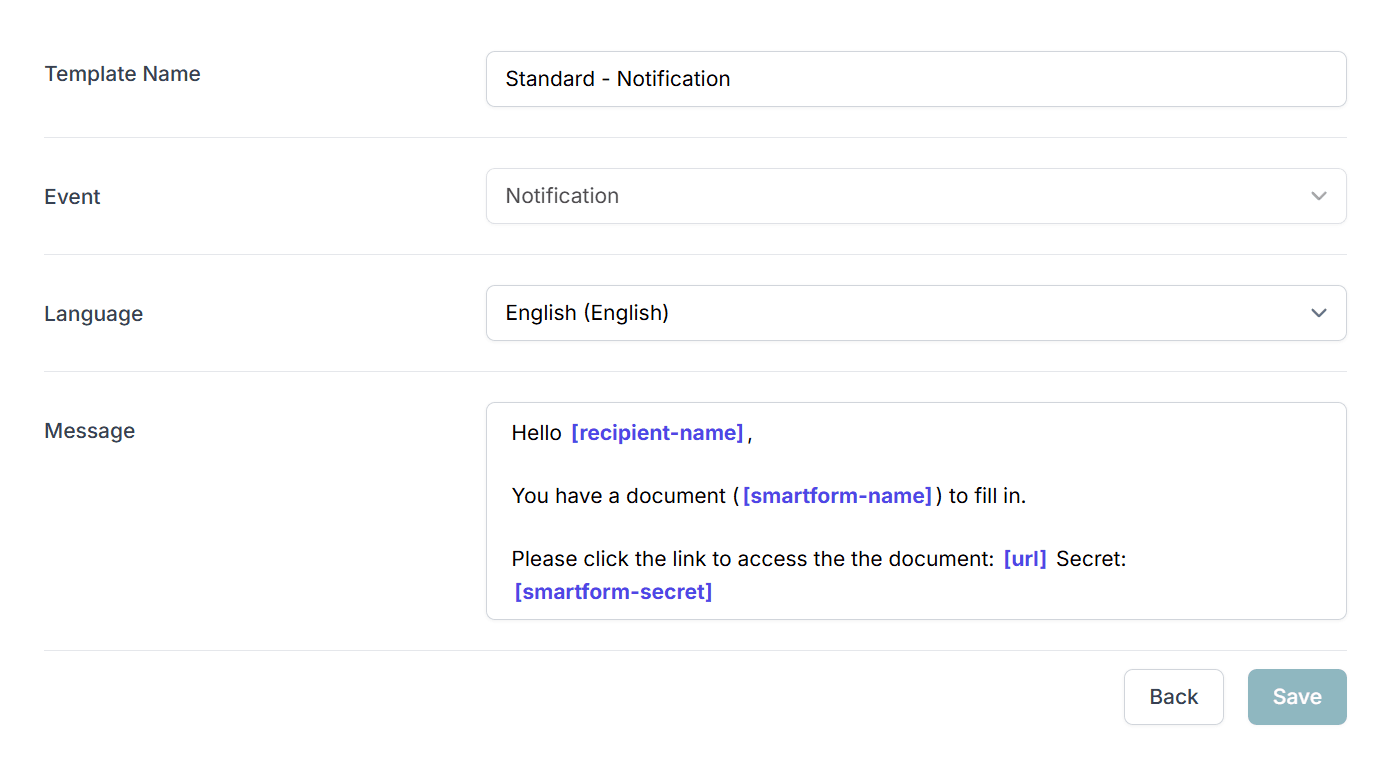
SMS
SMS messages are sent in several situations to notify a recipient.
They are best used in 1-on-1 situations.
Important:
Using SMS as a method to mass distribute a Smartform or a Dialog is not recommended.
This method often results in a low open rate and has security concerns.
SMS Events
| Event | Explained |
|---|---|
| Notification | Message sent to notify about a new Smartform. |
| Process steps | Messages sent when a Smartform is following a process (Dialog). |
| Security Code | SMS sent with a security code to open a Smartform. |
| Reminder | SMS reminders sent automatically after a set number of days. |
Placeholders for SMS
Available placeholders depend on the event type.
Standard placeholders (Notification, Process Steps, Reminder)
- Recipient Name
- SmartForm Name
- SmartForm Secret
- URL (required for Notification, Process Steps, Reminder)
Security Code placeholders
- Company Name
- Recipient Name
- Security Code (required)
Emails are used in several events when interacting with a Smartform/Dialog.
For example, to notify a recipient when an action is required.
Email Events
| Event | Explained |
|---|---|
| Notification | Email message sent to notify about a new Smartform or Dialog (process). |
| Process steps | Emails sent when a Smartform is used in a Dialog with multiple steps. |
| On Completion with PDF | Email sent with a PDF file copy of the completed Smartform. |
| Security Code | Email containing a security code to open a Smartform. |
| Reminder | Reminder email sent automatically after a defined number of days. |
Placeholders for Email
Available placeholders depend on the event type.
Standard placeholders (Notification, Process Steps, On Completion, Reminder)
- Recipient Name
- SmartForm Name
- SmartForm Secret
- URL (required for Notification, Process Steps, Reminder)
Security Code placeholders
- Company Name
- Recipient Name
- Security Code (required)
Summary of Required Placeholders
| Event | Required Placeholder(s) |
|---|---|
| Notification (SMS/Email) | URL |
| Process Steps (SMS/Email) | URL |
| On Completion with PDF (Email) | None |
| Security Code (SMS/Email) | Security Code |
| Reminder (SMS/Email) | URL |
Example Template Usage
Full HTML Email Example (Notification)
- Template Name:
Standard - Notification - Event:
Notification - Subject:
Document ({{SmartformName}}) needs your attention - Body Format: HTML
- Message:
<!DOCTYPE html>
<html lang="en">
<head>
  <meta charset="UTF-8">
  <meta name="viewport" content="width=device-width, initial-scale=1.0">
  <title>Email Template</title>
</head>
<body>
  <!-- Light grey background with white content area -->
  <div class="email-container">
    <p>Hi <strong>{{RecipientName}}</strong> ({{Email}}),</p>

    <p>You have gotten a new digital document that needs your attention
    (<strong>{{SmartformName}}</strong>).</p>

    <p>Please click this link in order to open the document:</p>
    <p><a href="{{URL}}" target="_blank">{{URL}}</a></p>

    <p>Smartform Secret Message: <strong>{{SmartformSecret}}</strong></p>

    <p>Best regards,<br/>Your Company</p>
  </div>
</body>
</html>